Clarity 16.5.0 is now available. Broadcom’s latest release brings improvements to portfolio visualisation, financial governance, native reporting, AI integration and the everyday experience of managing projects and resources.
Rather than listing every change, we’ve selected the capabilities that matter most for portfolio leaders, PMOs, finance teams and Clarity administrators—and explained what they make possible.
1. Turn Portfolio Data into Better Decisions
Enterprise portfolio management is not simply about collecting investment information. It is about understanding where money and capacity are committed, how investments relate to one another, and which areas need attention.
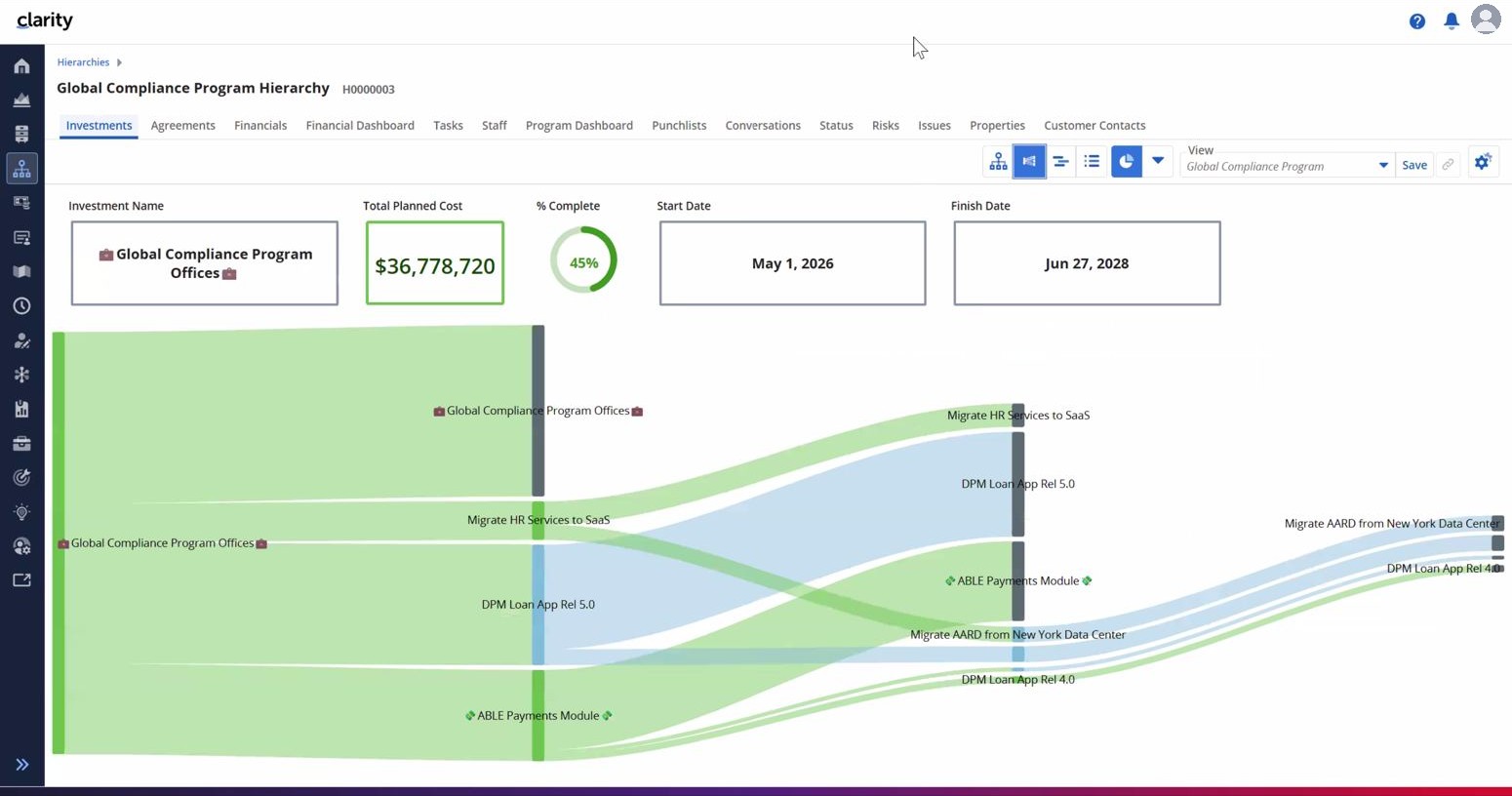
Visualise investment distribution with Sankey diagrams
New Sankey diagrams in hierarchy components show how a selected metric flows through investment levels. For example, portfolio leaders can explore the distribution of project costs across a hierarchy, with the flows coloured by an attribute such as work status. Periods and totals can be configured in the view.
Instead of working backwards from large tables, decision-makers can quickly see which parts of a portfolio account for the largest share of costs—and then investigate the underlying investments.
Explore related information without losing context
Hierarchy grids can now display nested sub-objects, such as staff and their allocations, directly beneath investment rows. Selected-record widgets can also update their metrics as users select different investments. Together, these improvements make hierarchy views more useful as an interactive management workspace.
Business value: clearer investment relationships, faster exploration of cost drivers and fewer disconnected views during portfolio reviews.
2. Strengthen Financial Governance and Funding Control
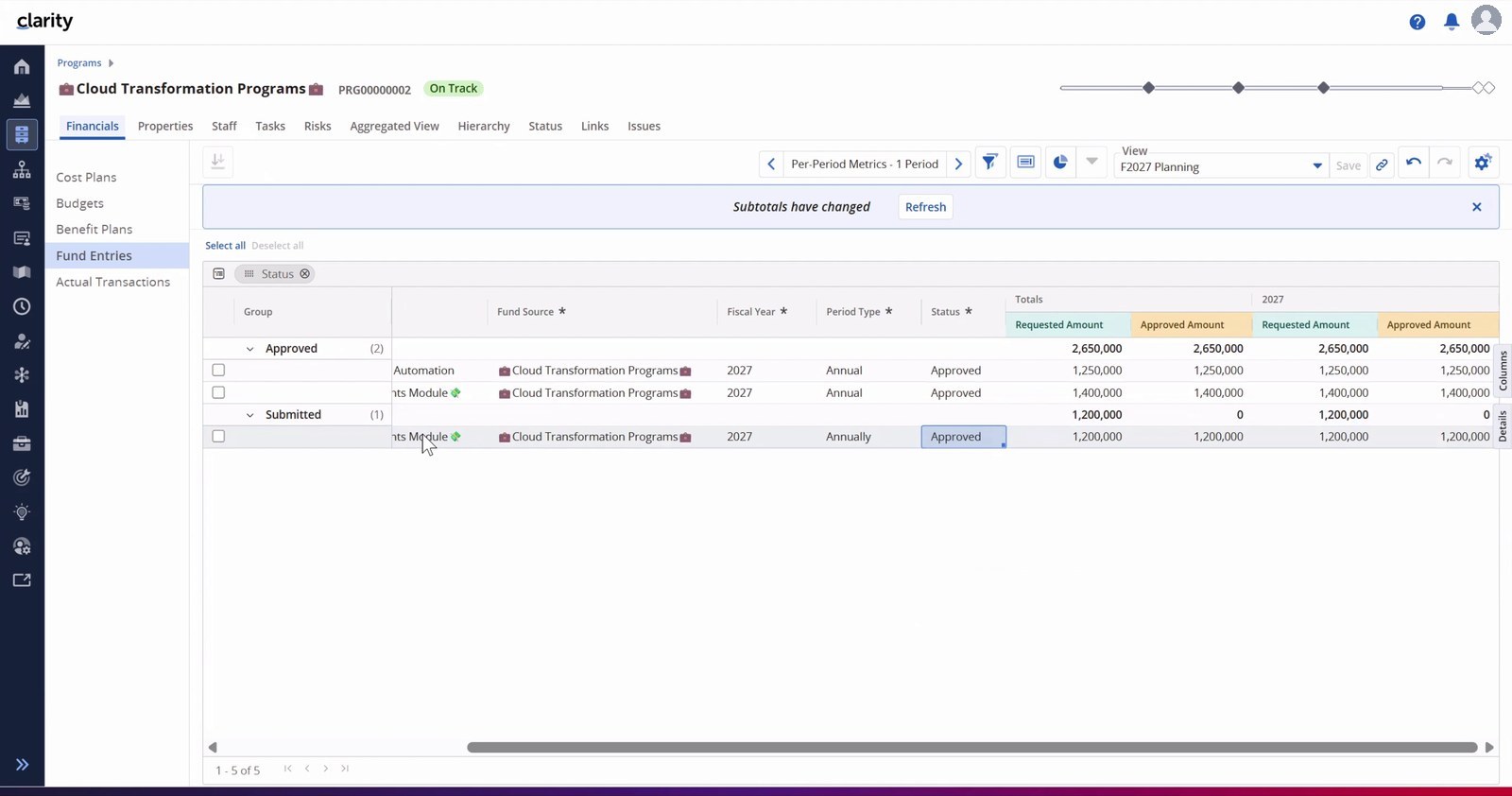
Manage funding requests and approvals in Clarity (Beta)
In many organisations, funding is allocated to a programme or another investment vehicle and released progressively to the initiatives it supports. Without a common system, requests, approvals and funding gaps can become difficult to track.
Drawdown Funding introduces a structured way to configure which investment types can request funds from which sources, create funding entries, submit them for approval and track the amounts distributed. The receiving investment’s cost plan shows funded and unfunded amounts, while the funding source can monitor commitments against remaining funds.
Imagine a transformation programme with several projects competing for additional funding. Programme leaders can review requests in context, and project managers can see how much of their planned work is financially covered.
See staffing costs alongside allocations
Clarity now exposes allocation, actual and forecast staffing costs in investment staffing and resource planning views. These values use the standard rate matrix, helping authorised managers understand the cost implications of staffing decisions without depending on a separate financial plan for every question.
For example, when a resource allocation changes, the related allocation cost can be recalculated in the planning view—making the financial consequences of capacity decisions more visible.
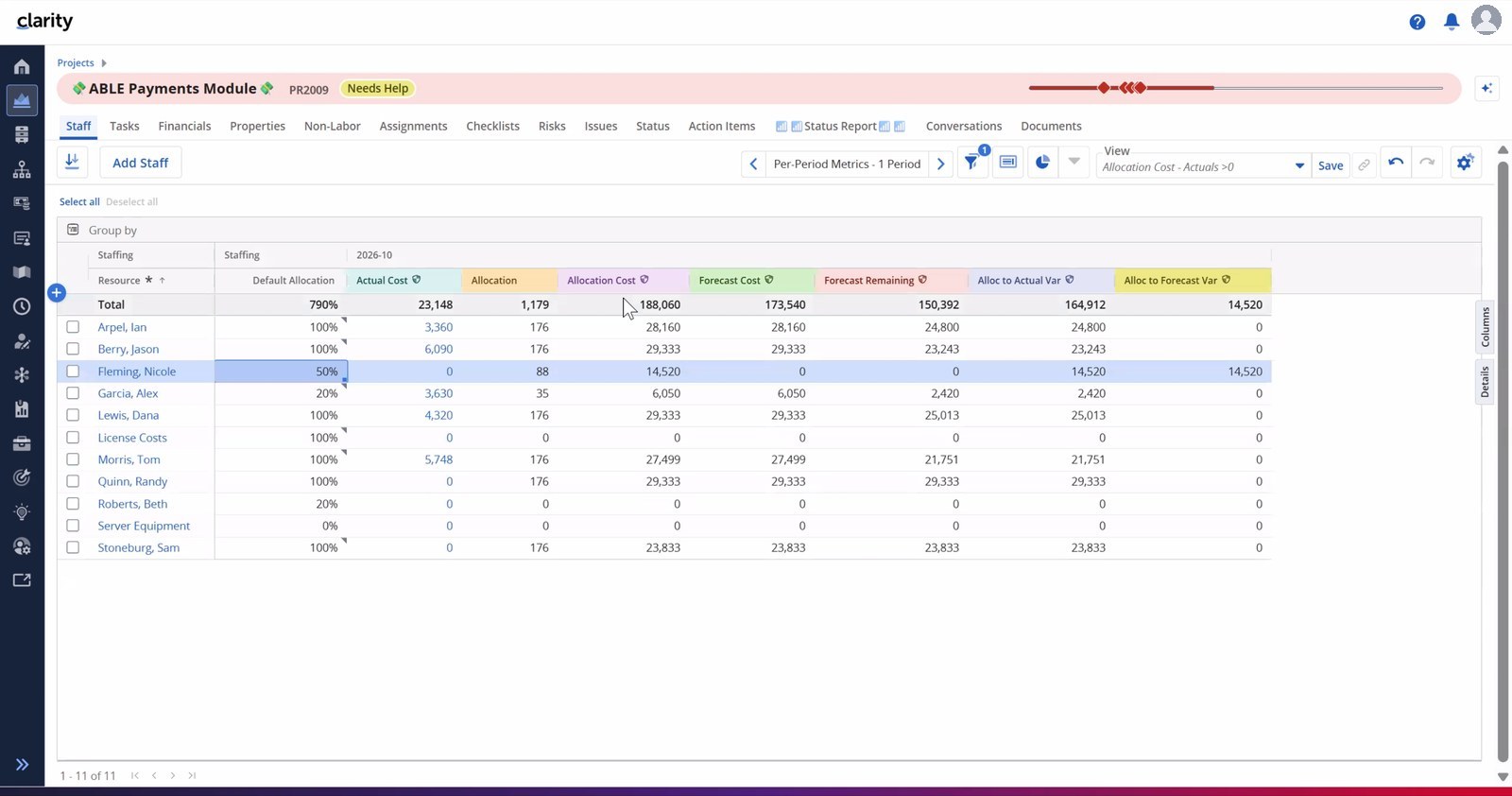
Administrators should review access to the new cost attributes, which are secured by default after upgrade, and run the relevant population jobs for existing records.
Business value: more transparent funding decisions and a closer connection between capacity planning and investment economics.
3. Make Native Reporting More Actionable
One of the strongest themes of Clarity 16.5.0 is the continued development of Clarity’s native reporting capabilities. The enhancements improve how reports are accessed, explored, formatted and distributed.
Run reports from the work you’re already doing
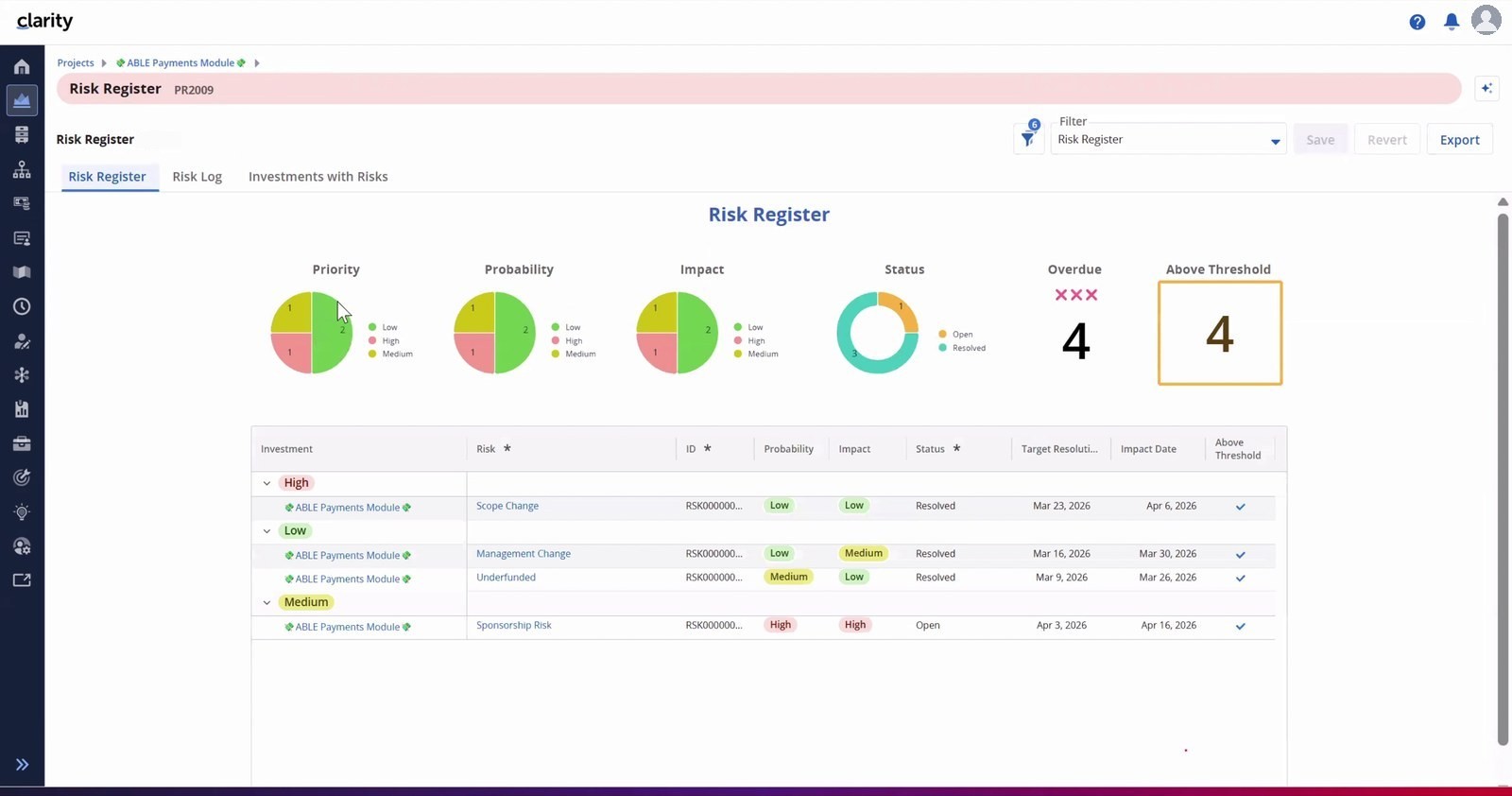
Reports can be configured as object or sub-object actions. A project manager can, for example, launch a Risk Register directly from a project’s Risks module. Blueprint attributes and selected records can be passed as report parameters, reducing the need to navigate to a separate report library and rebuild the context.
Move from summary numbers to the underlying detail
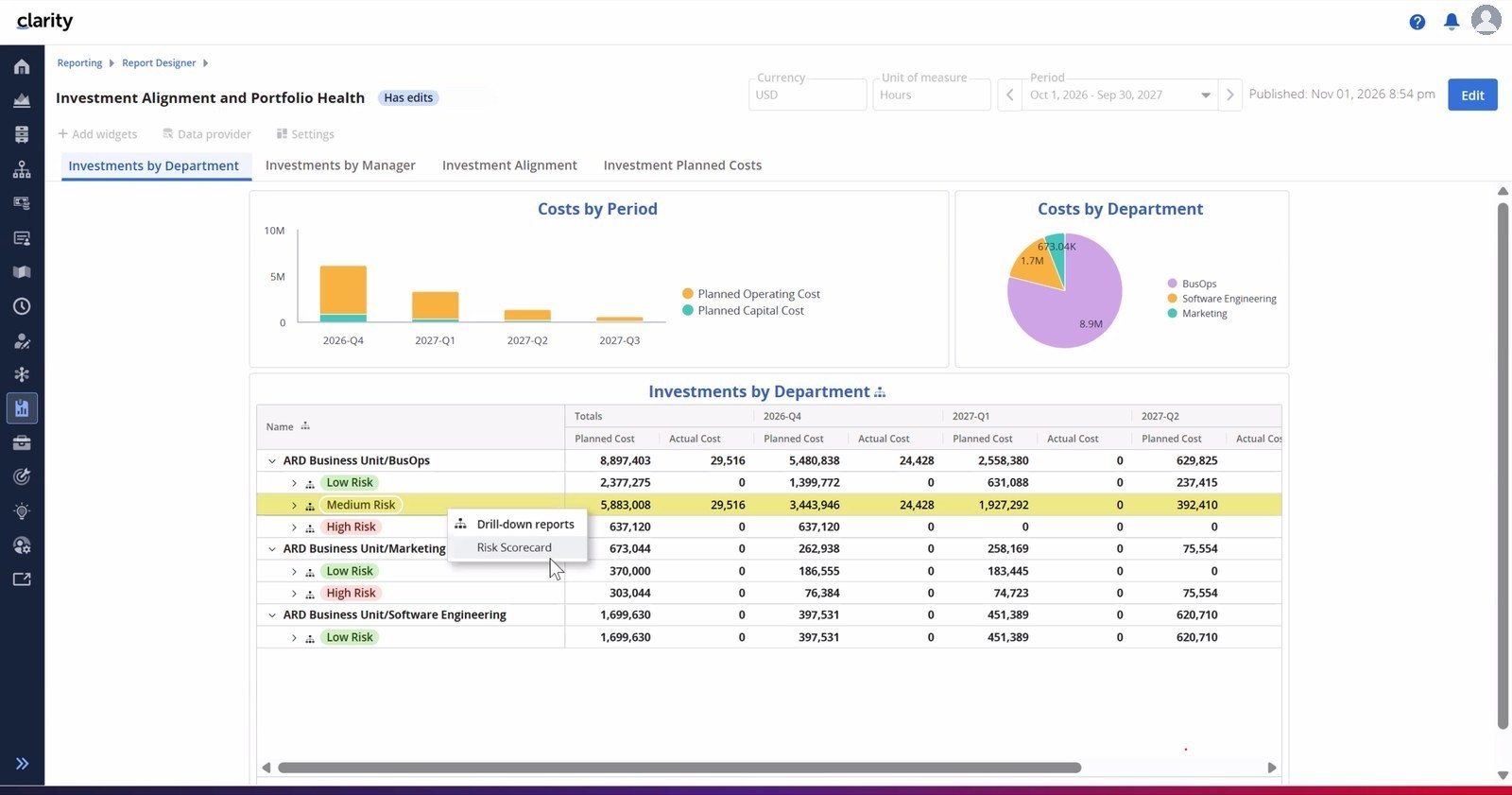
New table drill-downs allow users to open related sub-reports from grouped rows or detailed columns, with the parent report’s filters carried forward. Additional enhancements include per-period metric filters, sorting by totals, distinct counts, configurable group expansion, glyph-based conditional formatting and report-level aggregation.
This makes it easier to investigate why a metric is off target instead of stopping at a dashboard-level warning.
Share reports more flexibly
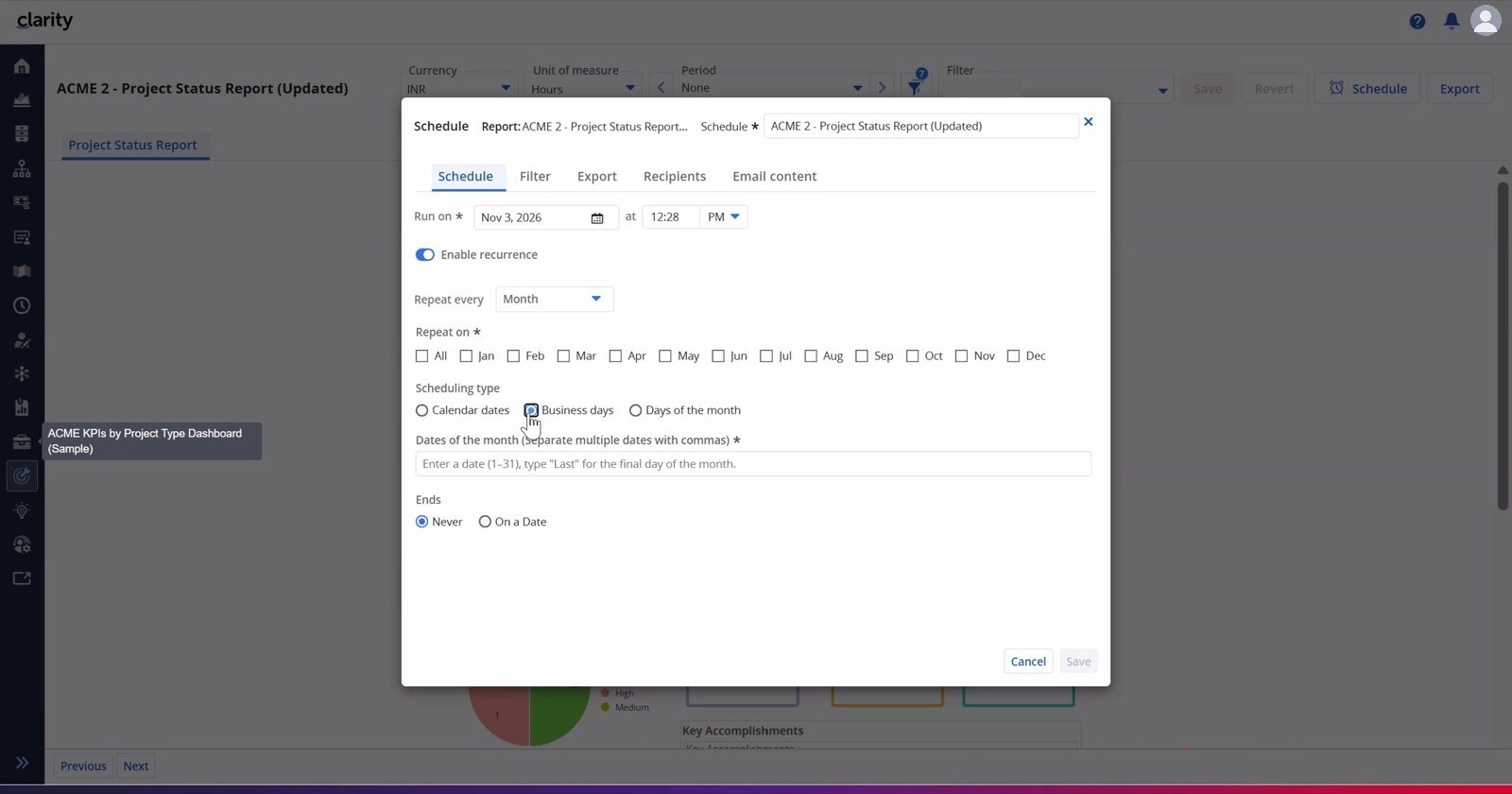
Responsive layouts can be exported or scheduled, and report scheduling supports more sophisticated timing rules—including business days and patterns such as the second Tuesday of the month. For on-premises deployments, scheduled output can also be delivered through SFTP.
The release also improves data providers and the data warehouse, including cost and benefit plan headers, attribute relabelling and more flexible date and lookup handling. Jaspersoft is removed in Clarity 16.5.0, making the native reporting transition especially important for organisations with legacy reports.
Business value: reports become easier to access at the point of work, more useful for investigation and more reliable to distribute to stakeholders.
4. Prepare for Enterprise AI with Stronger Controls
Clarity 16.5.0 strengthens the foundation for secure AI-assisted interactions with portfolio information. The release’s AI story is primarily about integration, permissions and traceability.
Manage AI access through the MCP server
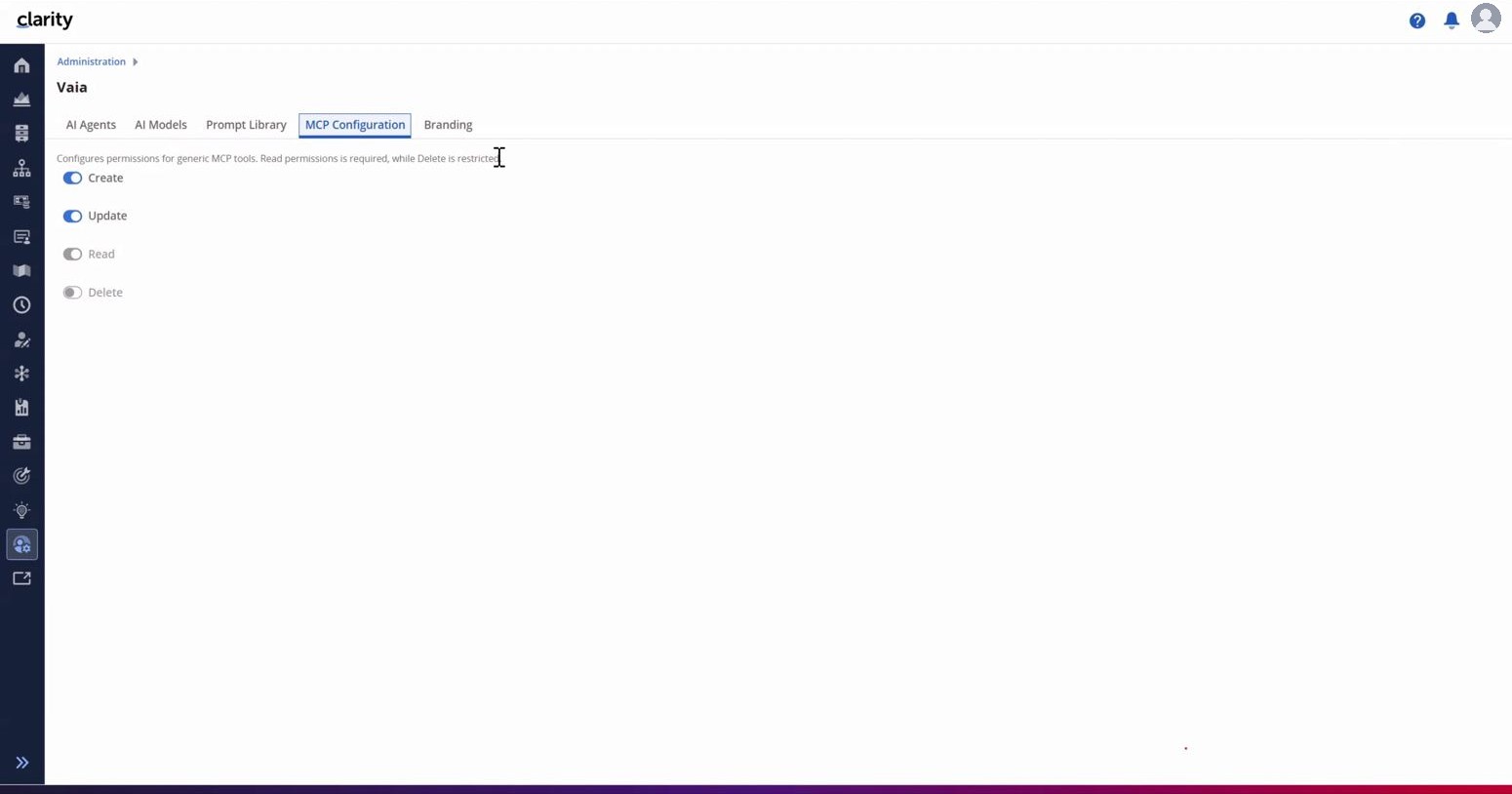
Clarity’s Model Context Protocol (MCP) server gains dynamic metadata discovery, helping compatible AI clients understand configured objects, fields and picklists. Authentication moves toward OAuth and enterprise single sign-on, while administrators can configure which create, read, update and delete operations the MCP server is allowed to perform.
These controls matter as organisations move from asking AI assistants questions to allowing them to interact with enterprise records.
Review and reverse supported changes (Beta)
Change History provides a record of supported updates to custom master objects, showing old and new values and enabling single or bulk rollback. This can help teams investigate an incorrect update and restore earlier values.
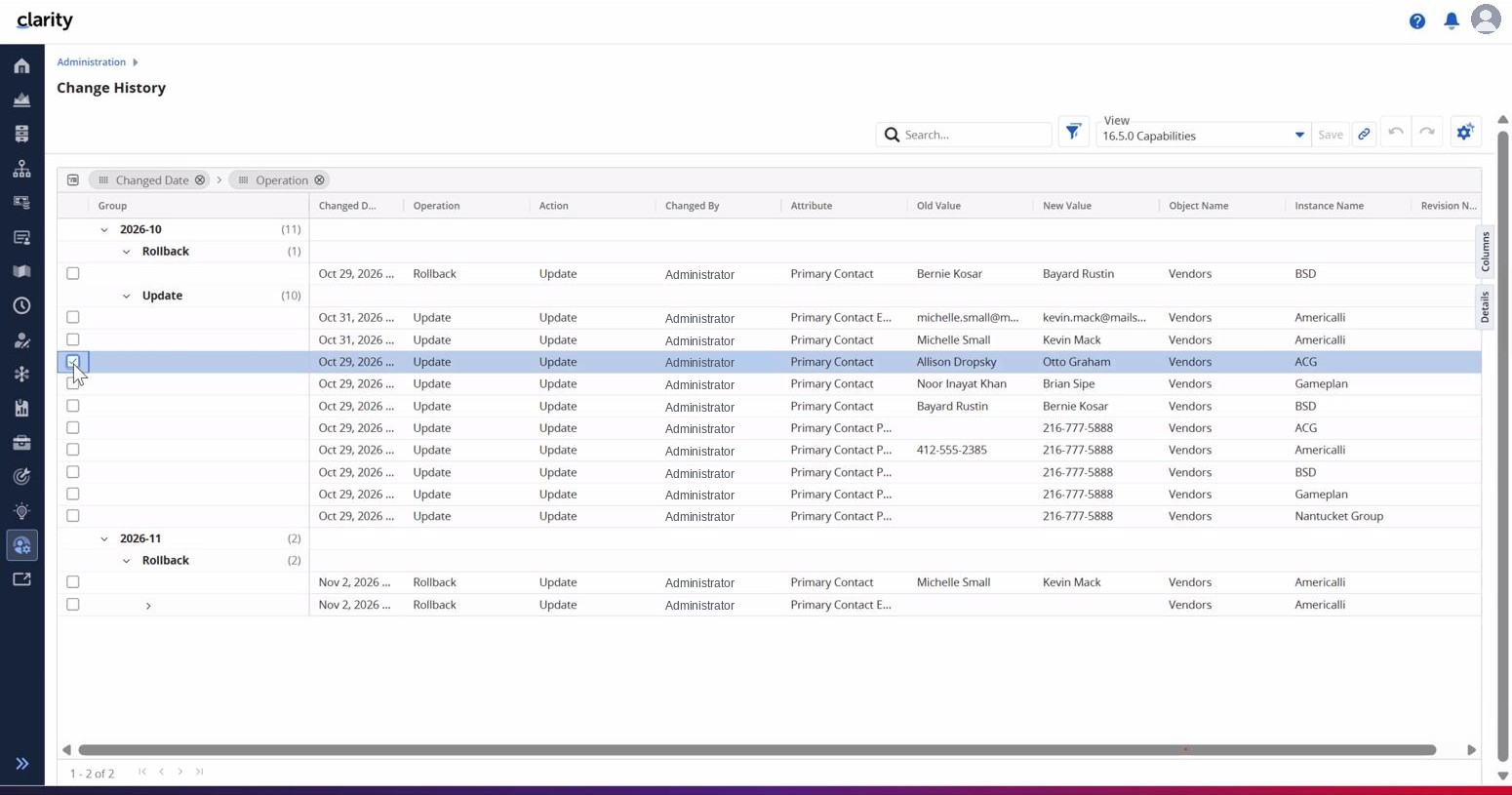
Change History is beta, complements rather than replaces Audit Trail, and has a narrower capture scope: it records updates—not creations or deletions—made through the REST API.
Business value: a stronger foundation for controlled AI integrations and automation, with clearer administrative safeguards.
5. Make Everyday Project Execution Easier
Some of the most immediately useful changes address repetitive work performed by project managers and delivery teams.
Work with tasks and assignments in one place
The task list introduces an expandable inline task-and-assignment tree, with per-period metrics and editable assignments. Project managers can assign several resources at once, select existing project staff or use the wider resource pool. WBS task type labels can also be mapped to an organisation’s terminology.
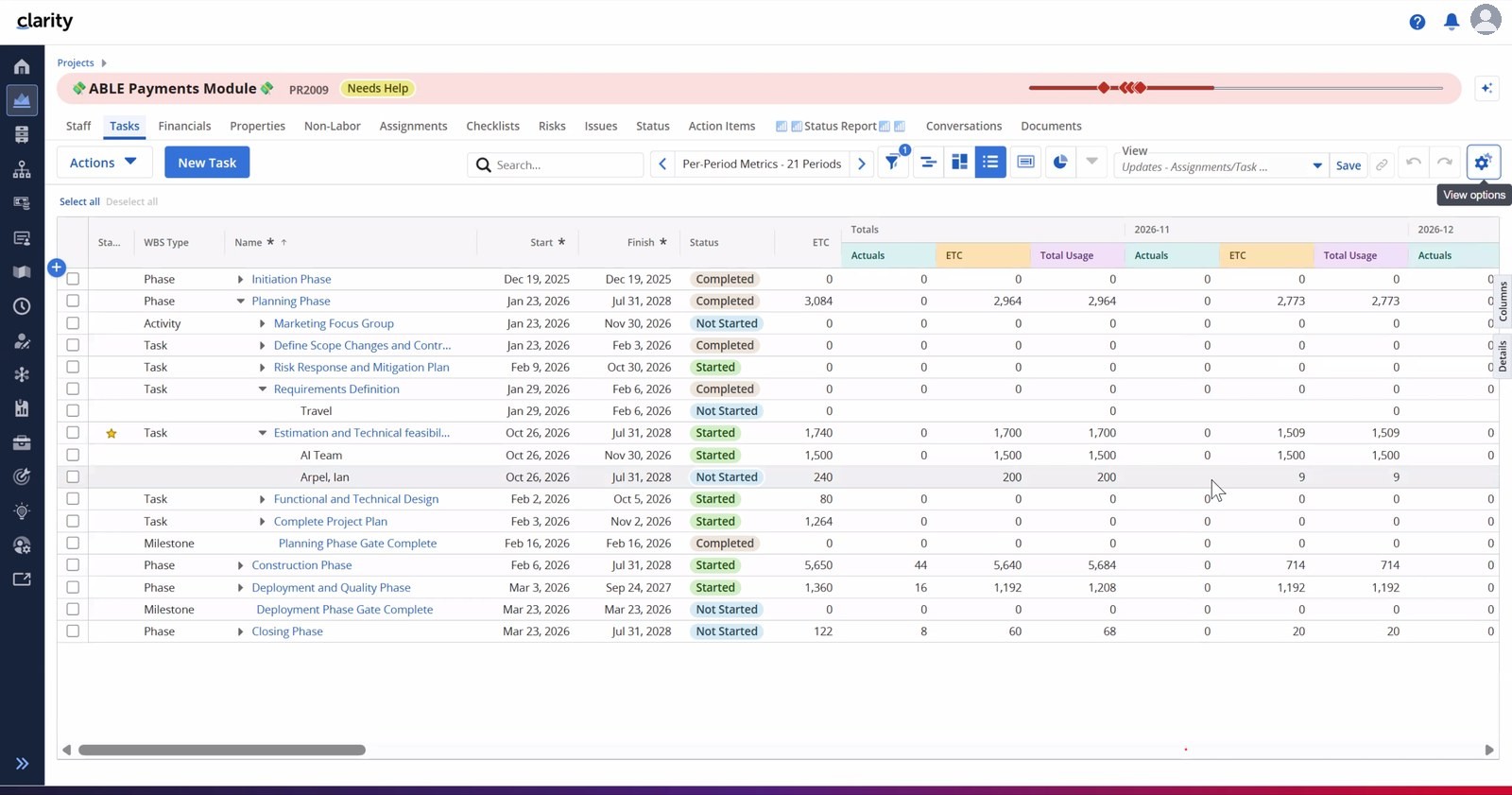
Other improvements include Undo/Redo for supported UI edits within the same layout, board and swimlane record counts, configurable resource-allocation colours, navigation from roadmap items to linked hierarchies and strategies, and additional timesheet and resource attributes.
Business value: fewer clicks, less repetitive administration and clearer day-to-day planning information.
6. Improve Automation and Configuration Management
Apply governance as soon as a record is created
Business rules and notifications can now run on Create and Create from Template, rather than only on updates. A new project could, for example, automatically grant the sponsor the appropriate cost-plan rights and notify the project manager.
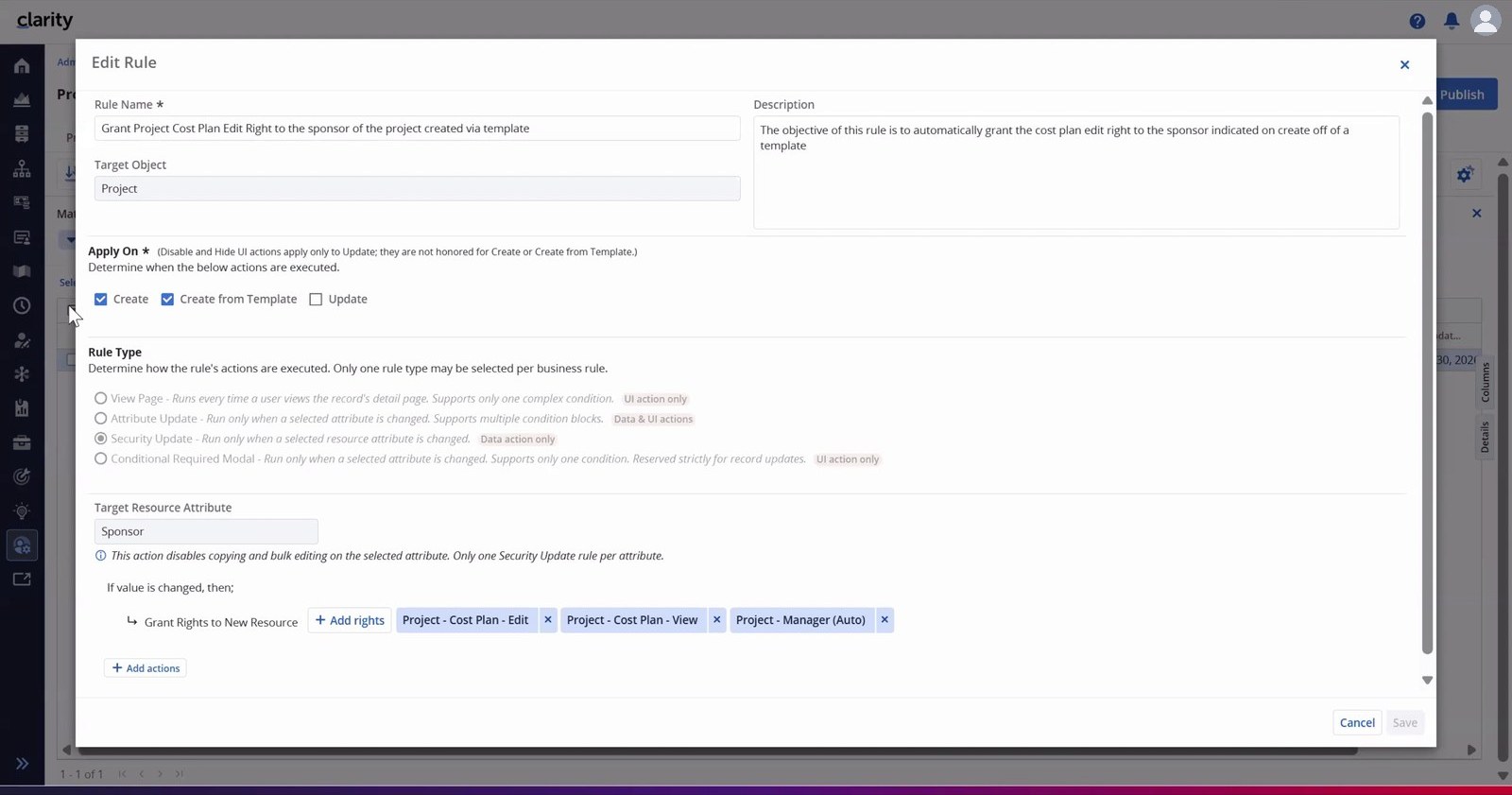
Move configurations between environments (Beta)
Configuration export/import capabilities now support published blueprints, views and navigation menus. This can reduce the effort required to reproduce application configuration across environments, although the beta has important constraints—for example, menu imports replace the entire menu configuration.
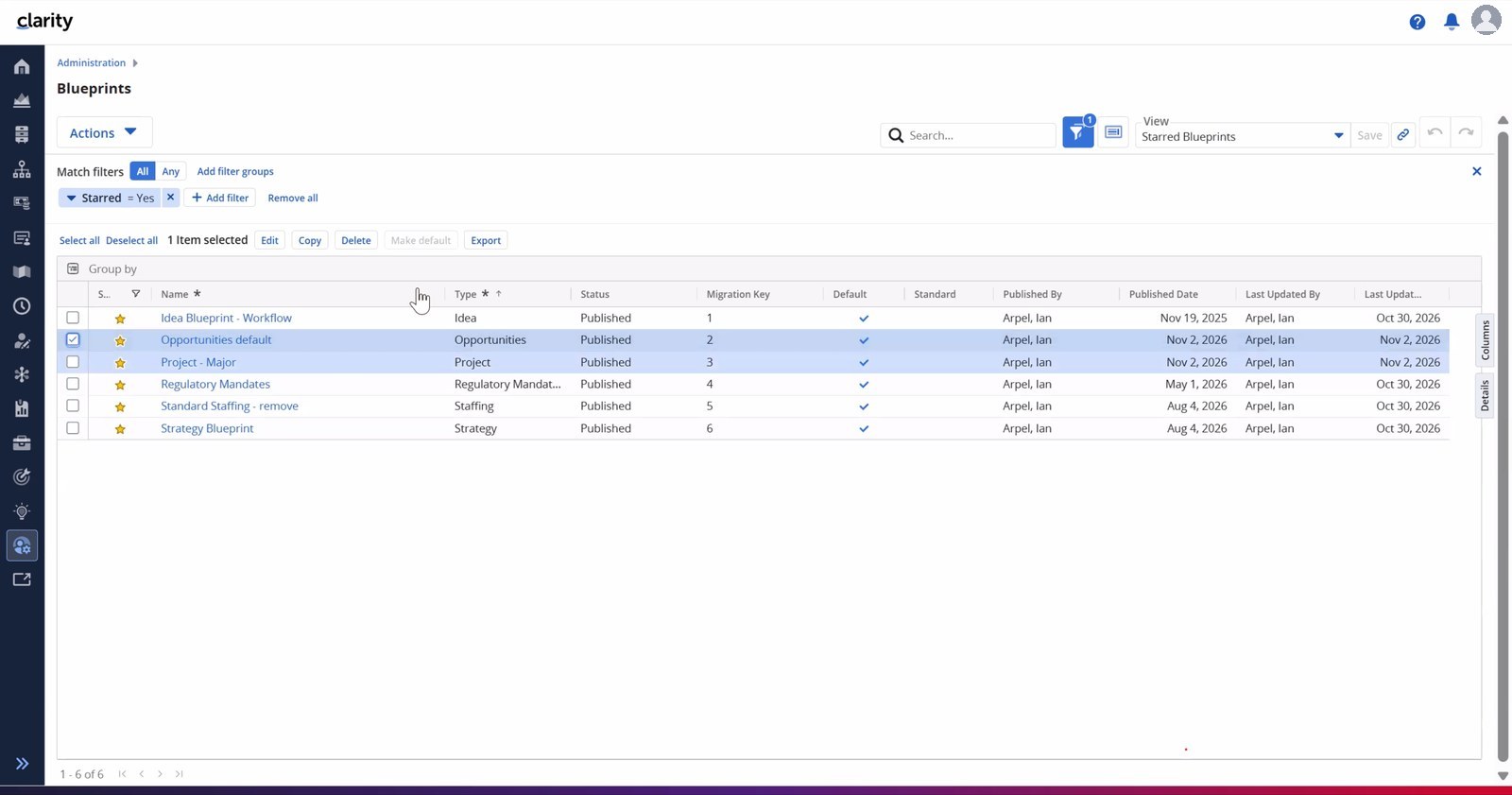
Clarity 16.5.0 also brings further customer-requested refinements to transaction classification, resource attributes and navigation. These additions reflect Broadcom’s ongoing customer innovation programme.
Business value: more consistent governance from the beginning of a record’s lifecycle and less manual effort managing configured environments.
What Does Clarity 16.5.0 Mean for Your Organisation?
Clarity 16.5.0 is more than a collection of new features. Its most relevant enhancements reinforce three outcomes that matter to enterprise SPM teams:
- Increase visibility: Explore investment relationships, funding commitments and staffing economics with richer portfolio views.
- Create alignment: Connect financial approvals, delivery priorities and governance controls to the work being funded.
- Optimise efficiency: Make reports actionable, reduce repetitive administration and simplify everyday project work.
For existing customers, this is a good opportunity to review current reporting practices, test the new financial governance capabilities and assess how the enhancements fit your Clarity configuration. For organisations evaluating SPM platforms, the release shows how Clarity continues to connect strategy, investment decisions and execution.
Get More Value from Clarity 16.5.0
Tricise helps organisations assess releases, plan upgrades, configure advanced capabilities and translate Clarity functionality into better portfolio management practices.