
Broadcom Clarity holds the data. Your steering committee still expects a document. A Word status pack on the corporate template. A PowerPoint deck that looks like every other deck in the company. Native Clarity reporting produces dashboards and grids for people who work inside Clarity – it does not produce an editable Word file or a PowerPoint slide. For years, Jaspersoft filled that gap in Clarity reporting. Broadcom ended standard Jaspersoft support for Clarity on 30 September 2026, and Clarity 16.5.0, planned for 9 November 2026, removes Jaspersoft-based reporting entirely (Broadcom knowledge base).
This post introduces the two products Tricise built to close the Clarity reporting gap: Tricise Docs for native Word documents and Tricise Visualizer for pixel-perfect PowerPoint – both filled from your own templates, both triggered with one click inside Clarity, both running beside Clarity without any customization. We show how they work, what they store (and what they never store), how an existing Jaspersoft report is taken over, and how you can try both for free.
The document gap in Clarity reporting
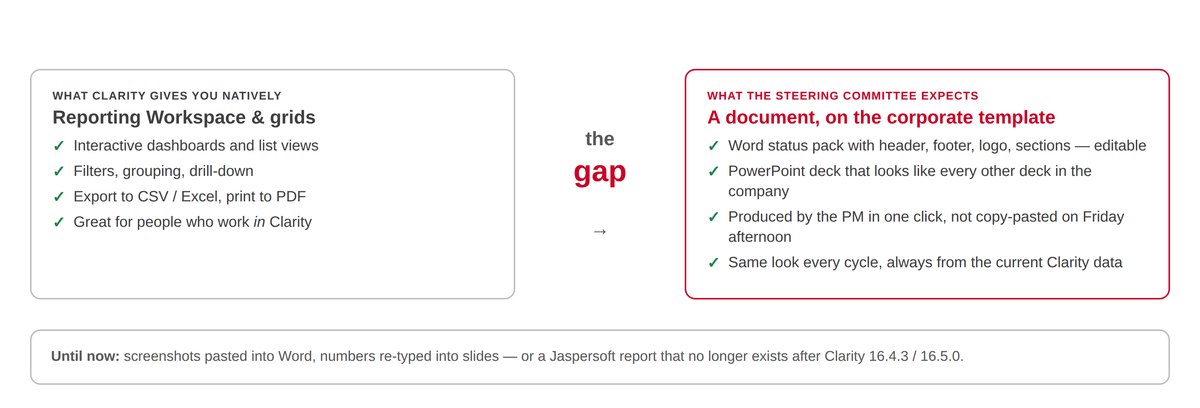
Let us be fair to the platform first: Clarity’s Reporting Workspace and its grids are good at what they were built for. Interactive dashboards, filters, grouping, drill-down, CSV and Excel export, print to PDF. If your audience works in Clarity, that is where they should stay.
The problem starts with the audience that does not work in Clarity. Boards, audit committees, customers, public funders. They receive a file. That file has a header and a footer, a logo, numbered sections, a table of risks, a signature block – and it is edited, commented and filed. Today most PMOs produce it by hand: screenshots pasted into Word, numbers re-typed into slides, every reporting cycle, usually on a Friday afternoon. The document is out of date by Monday.
The data is in Clarity. The document is not. That is the gap in Clarity reporting today.
Tricise Docs: native Word documents from your own template
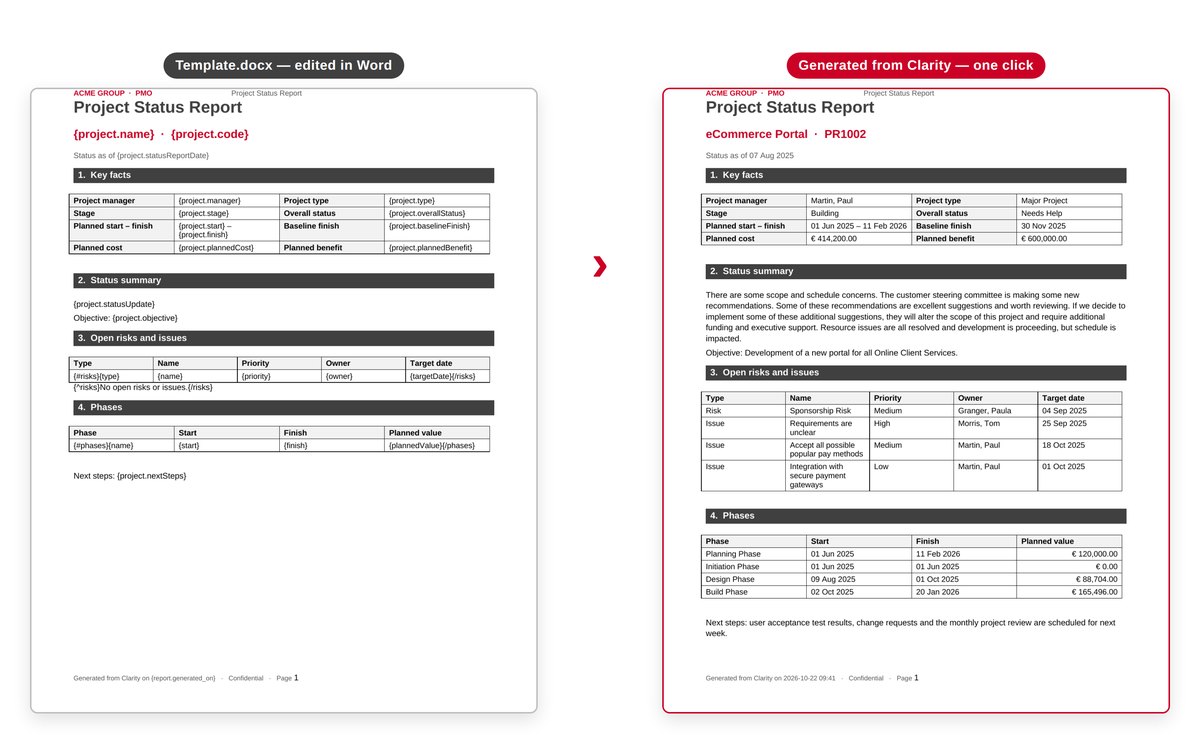
A Tricise Docs report is two files. The first is a normal Word document – your header, your footer, your logo, your styles, your tables – with placeholders where the data goes: {project.name} for a single value, {#risks} … {/risks} for a table row that repeats per risk, {^risks}No open risks{/risks} for the empty case. The second is a short report specification that says which entities of the Clarity Data Warehouse feed the template and how they are filtered.
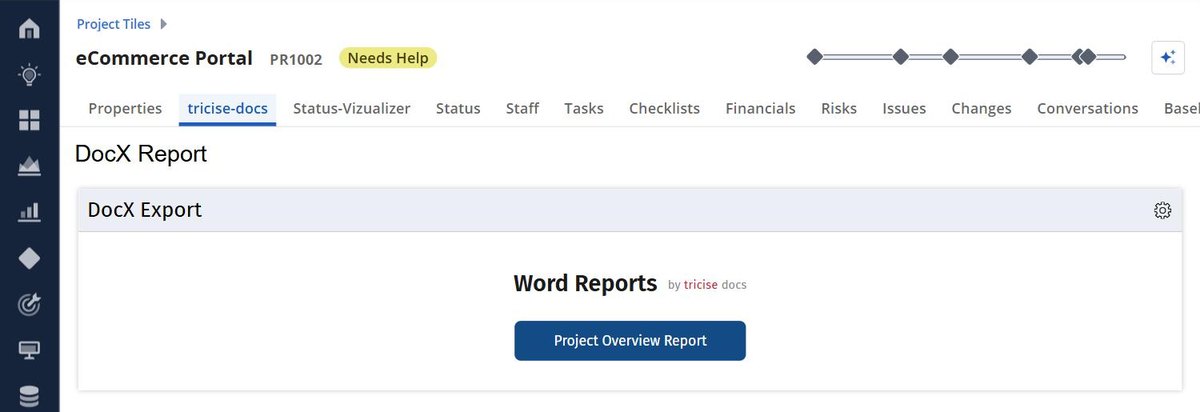
The end user never sees either file. They see a button in a Clarity project channel. One click, and the finished .docx downloads – editable text, real tables, header and footer exactly as designed in Word.
Behind the simple front, the engine reproduces the logic that used to live in a Jaspersoft report: nested sub-reports, lookups, UNION, ranking, GROUP BY summaries. Dates, numbers, currencies and booleans are formatted without any code in the document; derived fields are computed in the specification. Non-project reports get a parameter form – year, region, division – and a 165-page programme report renders in seconds. Every report has a draft and a published version: upload the new template, test-run the draft against live data, publish. The next click in Clarity gets the new version.
Tricise Visualizer: pixel-perfect PowerPoint with a preview
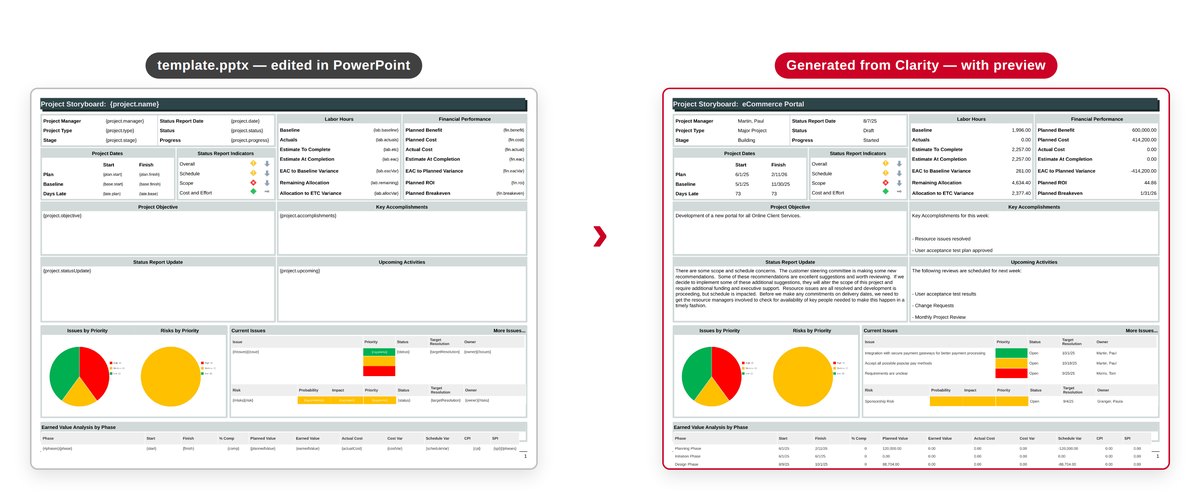
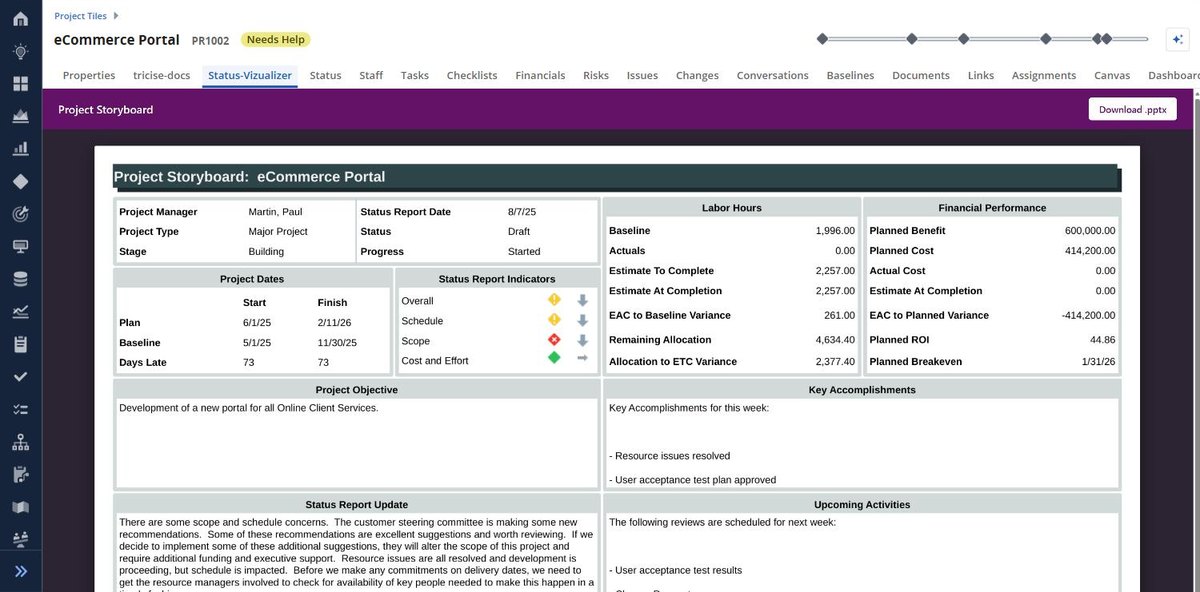
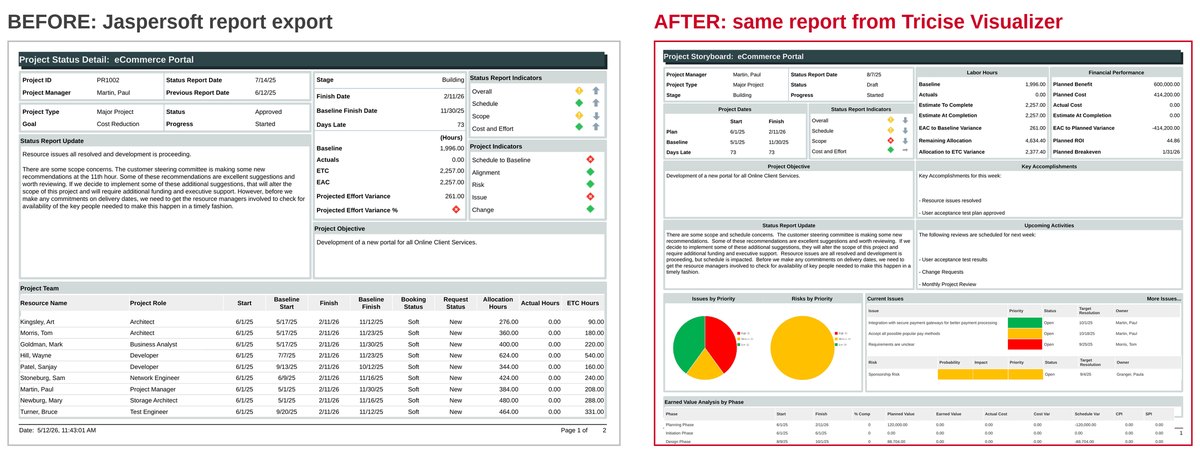
Tricise Visualizer applies the same idea to PowerPoint. The template is your own .pptx with {tokens}, table rows that repeat per record, and colour markers that turn a Clarity value into a RAG cell. Tables grow with the data and paginate onto continuation slides that repeat the section header; row heights are calibrated against PowerPoint itself, so the deck opens in PowerPoint exactly as designed. Pie charts, status diamonds and trend arrows are generated into named pictures of the template.
The difference to a plain download is the preview. The channel in the project shows the rendered slides first – previous, next – and then offers “Download .pptx”. Every open re-queries Clarity; a warm open or download takes about a second, so the deck is always the current state of the project.
How it works: one click, one token, one document
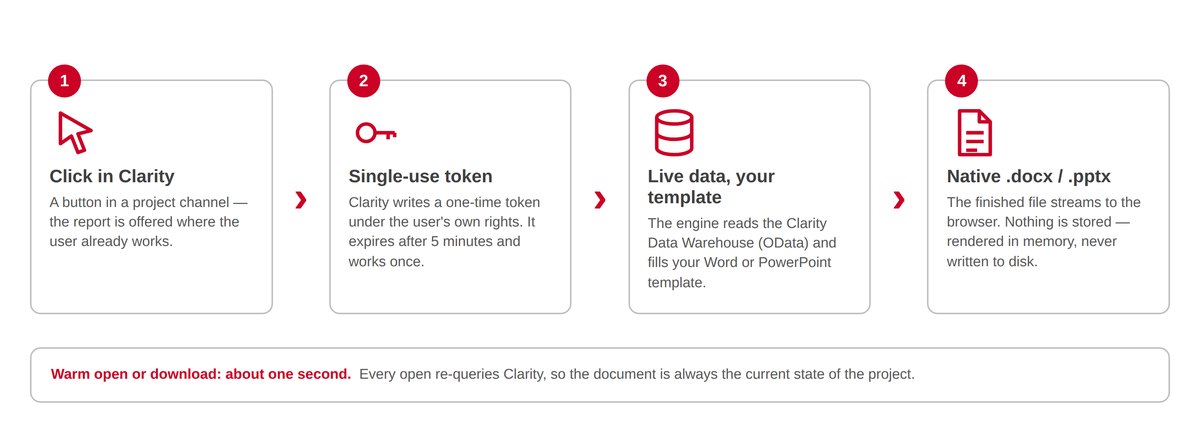
- Click in Clarity. A button in a project channel – a standard HTML portlet supplied by the admin console.
- Single-use token. The user’s own Clarity session writes a one-time token into a custom object. No rights on the project, no token, no report. The token expires after five minutes and works once.
- Live data, your template. The Tricise engine validates the token, reads the Clarity Data Warehouse through OData v4 and fills your template.
- Native .docx or .pptx. The finished file is rendered in memory and streamed to the browser. It is never stored.
Runs beside Clarity, not inside it
Configuration, not customization
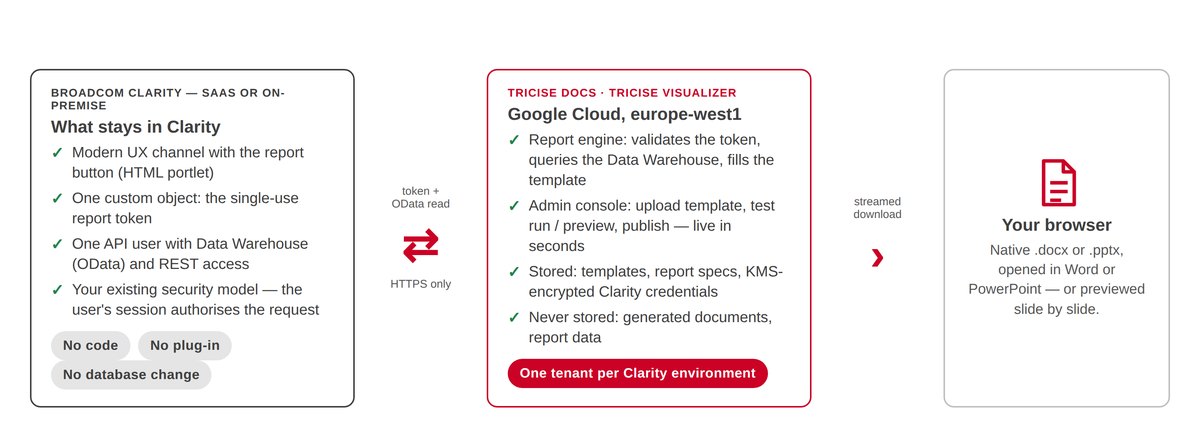
Nothing is installed inside Clarity. The platform needs three standard Studio items: one custom object that holds the single-use token, one HTML portlet in a channel (downloaded ready-made from the admin console and pasted into Studio), and one API user with Data Warehouse and REST rights. No code, no plug-in, no database change, no upgrade dependency – Clarity upgrades as usual, and your Clarity reporting keeps the same templates across releases. The report appears as a channel in the project blueprint, which is the standard way Clarity embeds external content, on SaaS and on-premise alike.
What we store – and what we never store
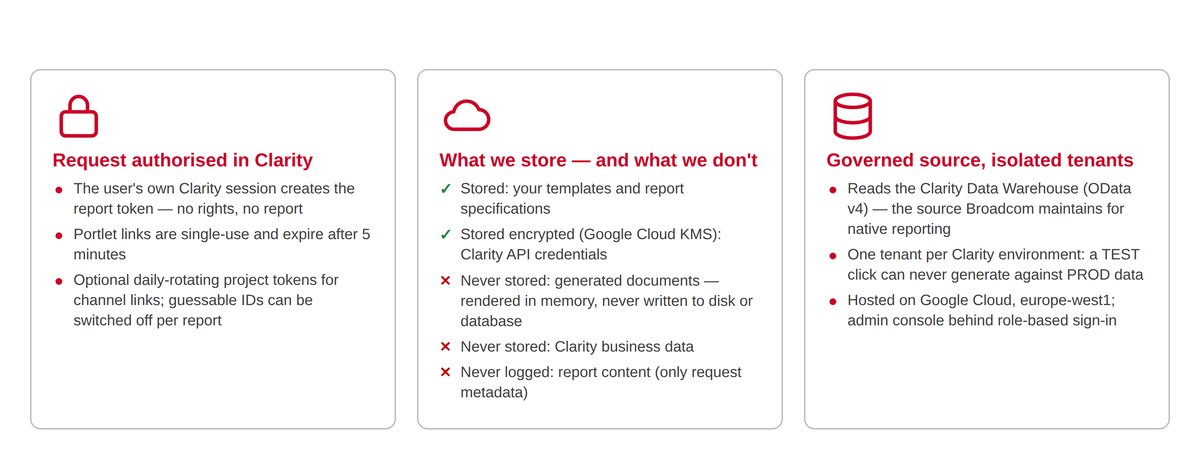
- Stored: your templates and report specifications; Clarity API credentials, encrypted with Google Cloud KMS and never readable back in the console.
- Never stored: generated documents and Clarity business data. Documents are rendered in memory and streamed to the browser – never written to a disk or database.
- Logged: request metadata only – route, tenant, report, status, duration. No query strings, no report content.
- Hosted: Google Cloud, europe-west1 (Belgium). One tenant per Clarity environment, so a TEST click can never generate against PROD data.
- Access: the admin console sits behind Google or e-mail sign-in with super-admin, tenant-admin and report-admin roles. End users never need an account – their Clarity session authorises the request.
Taking over your Jaspersoft reports
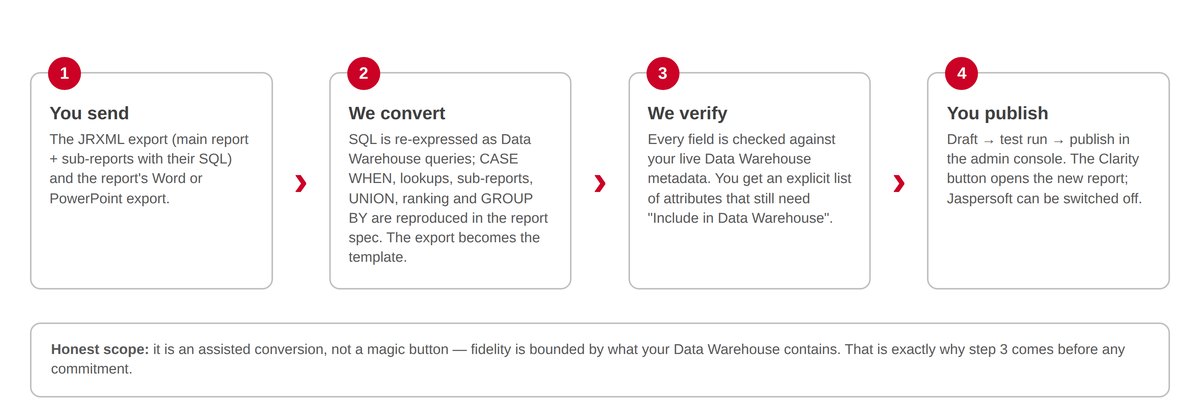
Most Clarity customers still have a folder of Jaspersoft reports at the heart of their Clarity reporting – reports people know and like. The layout can stay. From two things you already have – the JRXML export with its SQL and the report’s Word or PowerPoint export – we build the Docs or Visualizer report: the SQL becomes Data Warehouse queries, the export becomes the template.
Every field is checked against your live Data Warehouse metadata, and you receive an explicit list of attributes that still need the “Include in Data Warehouse” flag before anything goes live. It is an assisted conversion verified against your data, not a magic button – and that is exactly why the verification step comes before any commitment. For the wider migration picture, see our Jaspersoft EOL survival kit for Clarity reports.
What changes in Clarity reporting for the PMO
| Reporting need | Copy-paste and native exports today | Tricise Docs & Visualizer |
|---|---|---|
| Editable Word document on the corporate template | Assembled by hand from screenshots and copied numbers | Native .docx from your own template, filled from Clarity in one click |
| PowerPoint deck that looks like every other deck | Numbers re-typed into slides; tables shrink or overflow | Native .pptx; tables grow and paginate; charts and RAG generated |
| Current data at the moment of reporting | Out of date as soon as Clarity changes | Every open re-queries the Data Warehouse |
| Effort per reporting cycle | Hours per project, by the project manager | Seconds – the PM clicks, the document opens |
| Who changes the layout | A reporting tool or a developer | The PMO, in Word or PowerPoint – upload, test, publish |
| Footprint in Clarity | None – but the work sits outside every system | Standard configuration only: custom object, portlet in a channel, API user |
See both products live on 22 October
Webinar: Stop Copy-Pasting Clarity into Word & PowerPoint – Live Demo of Tricise Docs
Thursday, 22 October 2026 · 10:00 CEST in German · 15:00 CEST in English · 30 minutes, two live demos of Clarity reporting in Word and PowerPoint on a Clarity demo tenant, Q&A with Tamás Székely.
Launch offer for the first 20 attendees who sign up: a free trial of Tricise Docs and Tricise Visualizer, plus a proof-of-concept report that we build from one of your own samples – an existing Jaspersoft report or the Word / PowerPoint you fill by hand today. The claim form is shared in the session.