Java4Shell (CVE-2026-114938) is the critical OpenJDK vulnerability that the security firm Calif disclosed on 17 November 2026. Broadcom has since published Knowledge Base article 463103 on its impact on Automic Automation and the Automic Automation Kubernetes Edition (AAKE). The flaw sits in the Java runtime, not in Automic code. Your Automic components are only exposed to Java4Shell when they run on an affected JDK 17 or later on a host whose CPU supports AVX-512 VBMI.
This post explains how to check your environment, how to fix Java4Shell for good, which workaround protects you until then, and why this CVE is a strong reason to move to Automic V26.1.
Java4Shell at a glance
| Topic | Details |
|---|---|
| CVE | CVE-2026-114938, nicknamed Java4Shell |
| Severity | CVSS v4.0 score 9.2 (Critical) |
| Vulnerability | Heap overflow in the AVX-512 Base64 decoder of the OpenJDK HotSpot JVM on x86-64 |
| Attack | Remote and unauthenticated, using crafted Base64 input; can crash the JVM or lead to remote code execution |
| Affected Java | OpenJDK 17.0.6 to 17.0.21, Java 21 before 21.0.13.1, Java 25 before 25.0.5.1, Java 27 before 27.0.1.1, Oracle Java SE 8u511b33-perf |
| Affected CPUs | x86-64 with AVX-512 VBMI, for example Intel Xeon Ice Lake and newer or AMD Zen 4 and newer |
| Automic scope | Automation Engine and AAKE 24.x and 26.x on an affected JDK and CPU |
| Fix | JDK 17.0.21.1 or later, or the fixed 21, 25 or 27 build; for AAKE, the announced versions 24.4.7 or 26.1.1 |
| Workaround | JVM option -XX:-UseBASE64Intrinsics |
What is Java4Shell?
Java4Shell is a memory corruption flaw in the Base64 decoder of HotSpot, the JVM behind most OpenJDK distributions. On x86-64 CPUs with AVX-512 VBMI, HotSpot swaps the standard decoder of java.util.Base64 for a hand-optimised machine-code routine as soon as the method is JIT-compiled. In busy services that happens quickly.
A malformed Base64 string with an unexpected trailing = makes this routine miscalculate the output length. It then writes 62 to 63 bytes past the end of its heap buffer before Java rejects the input. The attacker controls where these bytes land, but not what they contain, so early analyses only expected crashes. Researchers then showed that careful heap shaping turns the overflow into read and write access to memory and finally into code execution inside the JVM.
Calif demonstrated remote code execution without login against Jira, Jenkins and Keycloak. The name is a nod to Log4Shell from 2021, but the two flaws are unrelated. Updating Log4j does nothing against Java4Shell; only a fixed Java runtime or a JVM option closes the gap.
Is Java4Shell being exploited?
As of 18 November 2026, no exploitation in the wild had been confirmed and the CVE was not in the CISA Known Exploited Vulnerabilities catalog. CISA still urged immediate patching in an alert on 17 November, and GreyNoise has reported exploitation attempts. Failed attempts often crash the JVM, so Java4Shell is also a denial-of-service risk for an automation platform that has to run around the clock.
Is Automic affected by Java4Shell?
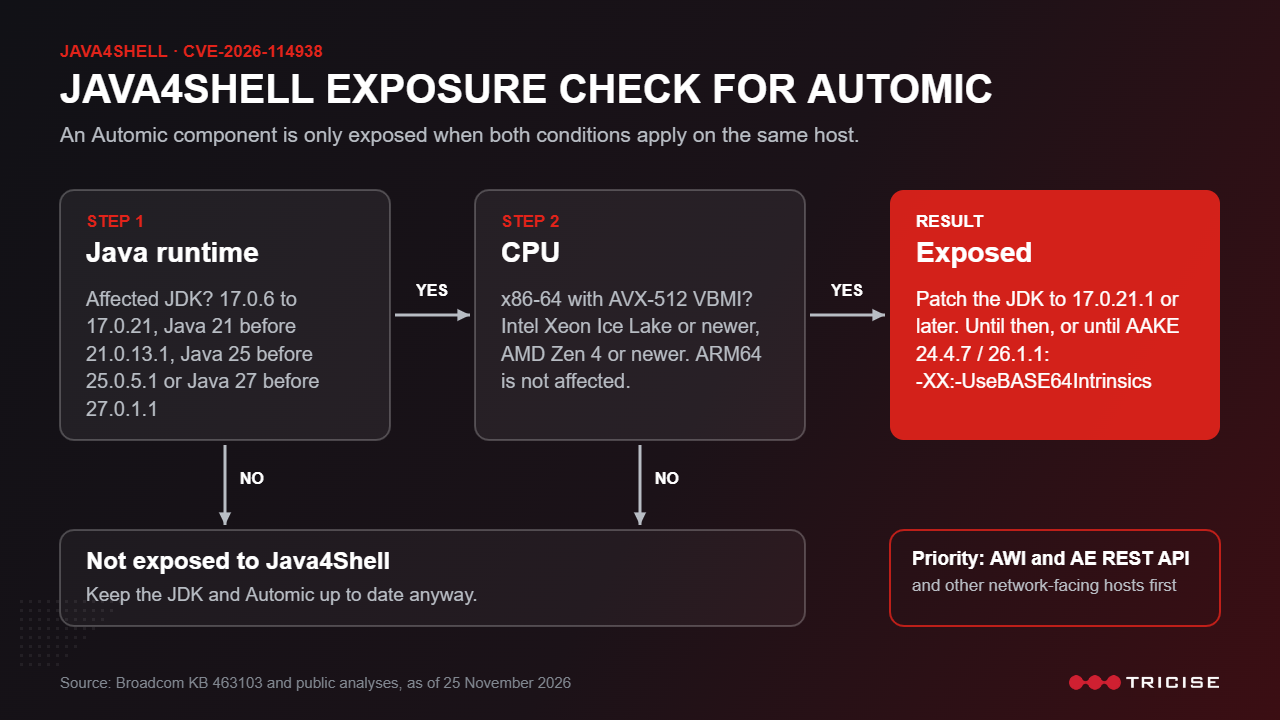
According to Broadcom, Automic is vulnerable to Java4Shell only when both conditions apply at the same time:
- Java: the component runs on an affected JDK 17 or later (see the version list above).
- CPU: the host has an x86-64 processor with AVX-512 VBMI support.
Broadcom does not bundle a JDK with the on-premises Automic components. The Java version that your Automation Engine, Automic Web Interface (AWI) and Java agents use is the one you installed, so the exposure depends on your own JDK. Broadcom names two components that do include OpenJDK: the Centralized Agent Upgrade (CAU) packages with a bundled JRE, and AAKE, where Broadcom manages Java in the Docker images.
Which Automic components you should check
| Component | Java comes from | What to do |
|---|---|---|
| Automation Engine Java processes (JWP, JCP, REST) | Your installed JDK | Update the JDK; workaround in UC4.smd |
| Automic Web Interface (AWI) | Your installed JDK | Update the JDK; workaround in the AWI start command |
| Java agents on premises | Your installed JDK | Update the JDK; workaround in UC4.smd |
| CAU packages with bundled JRE | JRE inside the CAU package | Follow KB 463176; do not edit packages manually |
| AAKE (Kubernetes) | Docker images managed by Broadcom | Workaround via JAVA_TOOL_OPTIONS until AAKE 24.4.7 or 26.1.1 is available |
Which CPUs are affected
The vulnerable code path only exists on x86-64 processors with AVX-512 VBMI. These include Intel Xeon Ice Lake, Sapphire Rapids, Emerald Rapids and Granite Rapids, as well as AMD EPYC and Ryzen processors based on Zen 4 or newer. Cloud instance families such as AWS c6i, m6i, c7i, c7a and m7a are reported as potentially affected. ARM64 systems, including AWS Graviton, and older x86-64 CPUs without AVX-512 VBMI are not affected.
Exposure is decided per host, not per installation. The same AE installation or container image can be vulnerable on one node and safe on another. This matters for AAKE clusters and virtualised environments in which workloads move between hosts of different CPU generations.
How to check your Automic environment for Java4Shell
A structured check takes a few hours for most landscapes and tells you exactly where action is needed:
- Inventory every JVM: list all Automation Engine servers, AWI instances, Java agents, agents deployed via CAU and AAKE pods, including test and disaster recovery systems.
- Check the running Java version: an updated JDK on disk does not protect a JVM that has not been restarted. Check which java binary each Automic process uses and run it with
-version. - Check the CPU flags: on Linux, the flags avx512f, avx512bw, avx512vbmi and bmi2 must all be present for the vulnerable path. On Windows hosts, compare the CPU model with the processor generations listed above.
- Check for an active workaround:
jcmd <pid> VM.flagsshows the flags of a running JVM. Look for UseBASE64Intrinsics or UseAVX. - Prioritise: hosts with an affected JDK and an AVX-512 VBMI CPU go to the top of the list, starting with components that accept requests from the network, such as the AWI and the AE REST API.
These Linux commands help with steps two and three:
# Which java binary does each Automic process use?
ps -ef | grep java

# Java version of that binary
/path/to/java -version

# CPU flags: all four must be listed for the vulnerable path
grep -m1 '^flags' /proc/cpuinfo | tr ' ' '\n' | grep -E '^(avx512f|avx512bw|avx512vbmi|bmi2)$'
How to fix Java4Shell in Automic for good
The only complete fix for Java4Shell is a patched Java runtime. Broadcom’s KB 463103 and KB 463176 give this guidance:
- JDK update: upgrade to 17.0.21.1 or later, or to the fixed builds 21.0.13.1, 25.0.5.1 or 27.0.1.1. If you use Corretto, Temurin, Zulu, Microsoft, Red Hat, SapMachine or Liberica builds, check your vendor’s advisory, because the fixed builds arrived on different schedules.
- AAKE: Broadcom manages Java in the Docker images. According to Broadcom, the upcoming AAKE versions 24.4.7 and 26.1.1 will include OpenJDK 17.0.21.1 or higher. Until they are available, use the workaround below.
- CAU with bundled JRE: according to KB 463176, manual changes to CAU packages, including files in the AE database or STORE objects, are not supported. Upgrade the Automation Engine to the latest 24.4 service pack or to V26.1 instead.
- CAU package choice: if you manage Java centrally, use the CAU packages without a bundled JRE. Packages with a bundled JRE overwrite the
bin/jredirectory on the agent host with every upgrade.
After the update, restart every JVM, rebuild and redeploy custom container images, and remove the temporary workaround flags once the fixed build is running.
Java4Shell workaround for Automic until you can patch
If you cannot update Java right away, Broadcom documents a JVM option that disables the vulnerable code path: -XX:-UseBASE64Intrinsics. It only switches off the optimised Base64 routine. Workloads that decode a lot of Base64 may run a little slower. Back up all configuration files before you start.
On premises: Service Manager, Automation Engine and AWI
- Back up the configuration files.
- In
UC4.smd, locateJWP_STARTCMD,JCP_STARTCMD,REST_STARTCMDand all Java agent lines that begin withDEFINE ... java. - Add
-XX:-UseBASE64Intrinsicsdirectly afterjava. - For the AWI, add the same option to the script or command that starts
aa-webui-launcher.jar. Older Tomcat-based AWI installations usesetenv.sh. - Restart the Service Manager and the AWI.
- Verify with
ps -ef | grep javathat every Java process shows the new option.
Schematically, the change in a start command looks like this (keep your existing parameters as they are):
# before
java -Xmx2g -jar ...

# after
java -XX:-UseBASE64Intrinsics -Xmx2g -jar ...
If the first option has no effect in your environment, Broadcom names -XX:UseAVX=2 as the alternative. It disables more CPU features and therefore costs more performance, and it only applies to x86-64. A JVM on ARM64 does not start with it. Analysts also warn against using -XX:DisableIntrinsic=_base64_decodeBlock on its own, because it can stop the JVM from starting.
AAKE: the Java4Shell workaround in Kubernetes
- Back up
values.yaml. - Under
environment, setJAVA_TOOL_OPTIONSto-XX:-UseBASE64Intrinsics. If the variable is already set, append the flag. - Roll out the change with
helm upgrade. - Confirm that all pods restarted, and restart any that did not.
- Verify the variable inside the pods.
- If needed, use
-XX:UseAVX=2instead.
helm upgrade <release> <chart> -n <namespace> -f values.yaml
kubectl -n <namespace> rollout restart deploy/<name>
kubectl -n <namespace> exec <pod> -- env | grep JAVA_TOOL_OPTIONS
Two pitfalls: values in the awi-properties or ae-properties ConfigMaps override aa-properties, and a Helm upgrade does not overwrite them. Check that they do not set JAVA_TOOL_OPTIONS. Automic agents that run outside the cluster follow the on-premises steps in UC4.smd.
Why Java4Shell is only the beginning: AI speeds up vulnerability discovery
Java4Shell was found with the help of AI. Calif’s researchers used AI to find the bug and to build their exploits. According to Dark Reading, an AI coding assistant found it in about an hour, and a first working exploit took about two more hours at a token cost of under 200 US dollars. The vulnerable code had been part of Java 17 since version 17.0.6, released in January 2023.
Security experts draw two conclusions from this. AI will surface many more long-hidden weaknesses in widely used software. And the same speed helps attackers, so the time between a bug being found and being used keeps shrinking. Java4Shell shows that as well: the triggering input appeared in a public OpenJDK pull request on 9 September 2026, and details leaked before the fixes were ready.
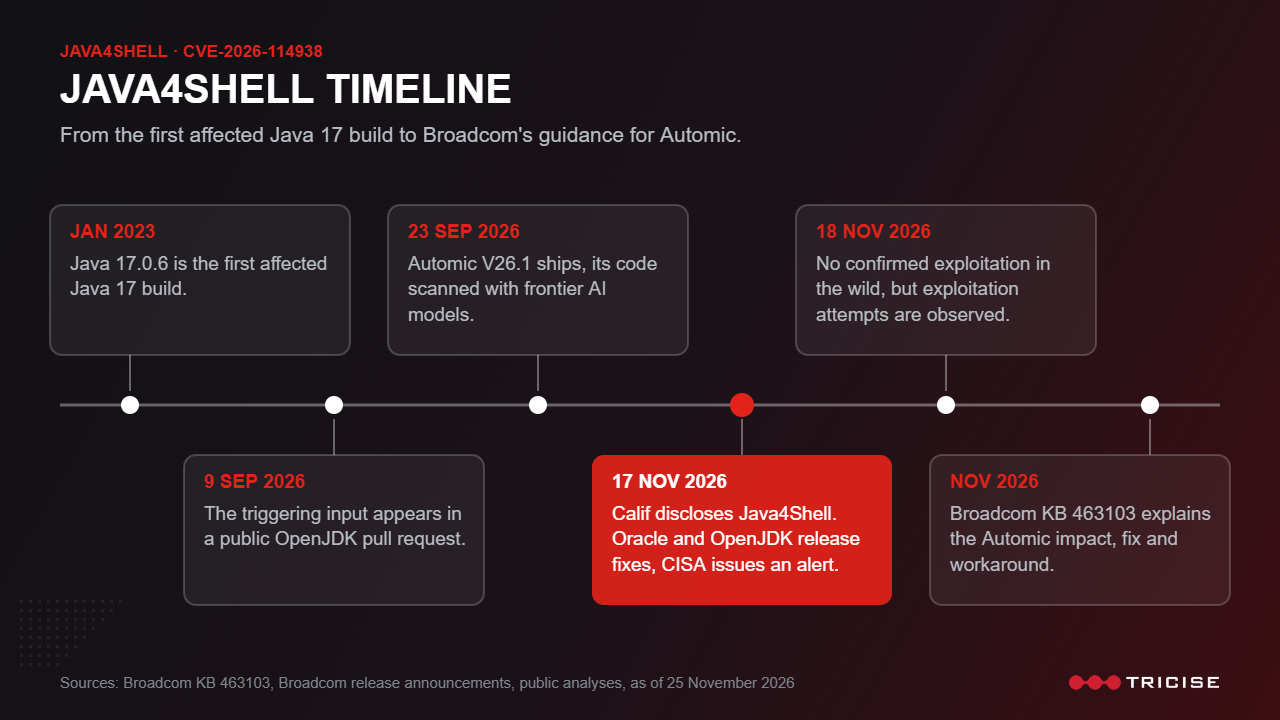
For Automic operators, this means that CVEs in Java, operating systems and third-party libraries will arrive more often and with less warning. A platform that orchestrates business-critical processes needs a patch path that works in days, not quarters. Broadcom also uses AI on the defensive side: Automic Automation V26.1 is the first Automic release whose source code was scanned with frontier AI models and fixed before general availability.
Keep Automic up to date: why we recommend at least V26.1
Java4Shell itself is fixed in the JDK. How quickly you can react to the next CVE, however, depends on your Automic version. For V26, Broadcom releases service packs and hotfixes only for the latest minor version, and only that version is supported. If no workaround exists, support may ask you to upgrade to it. The V26 line has a five-year support lifecycle counted from the release of the major version. V24.4 is maintained until 15 February 2029, but only with service packs and hotfixes; new features go to V26 and Automic SaaS.
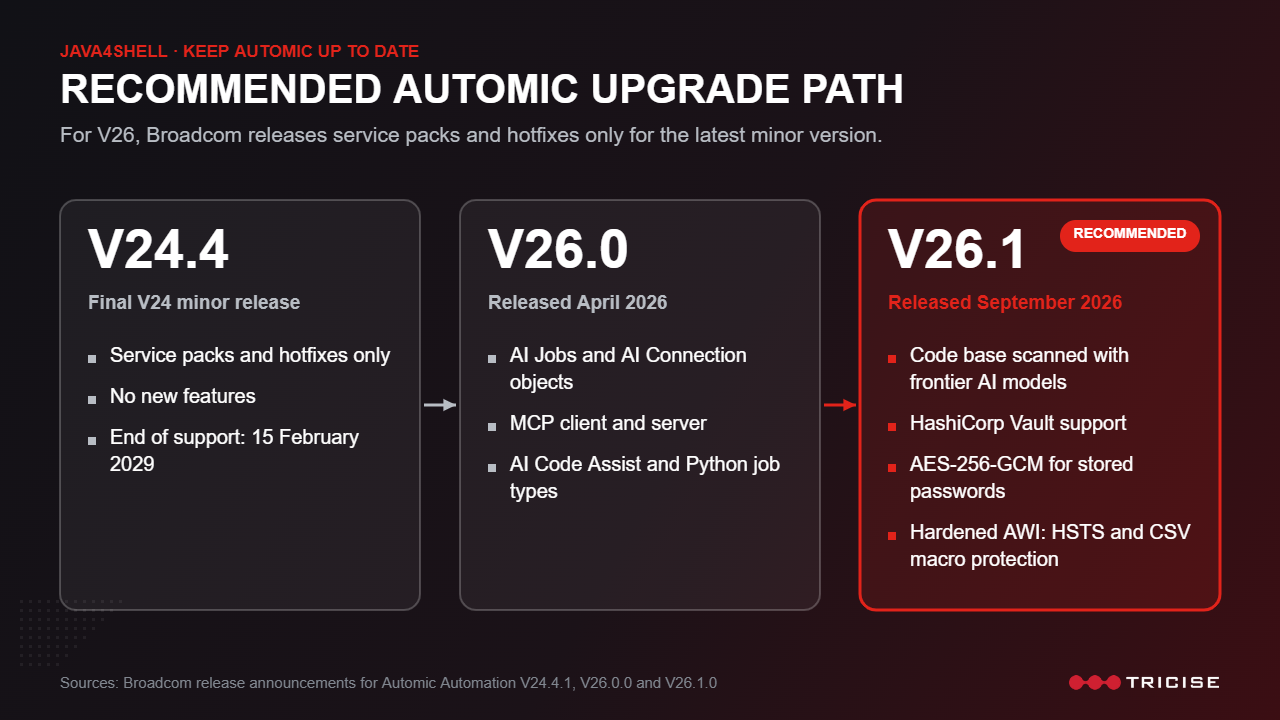
We therefore recommend at least Automic Automation V26.1 as the target for every on-premises and AAKE installation. Broadcom released it on 23 September 2026, and it offers clear advantages:
- AI-scanned code base: the first Automic release with an AI-driven scan-and-remediate pass before general availability, on top of the existing security testing.
- HashiCorp Vault support: agent login credentials stay outside the AE database and are retrieved during job execution.
- Stronger password protection: passwords in Login and Connection objects are protected with AES-256-GCM.
- AWI hardening: extended HTTP Strict Transport Security (HSTS) options and CSV macro protection enabled by default.
- Zero Downtime Upgrade (ZDU): V26 brings significant backend improvements to the ZDU process, based on Broadcom’s experience with Automic SaaS. In our experience, ZDU works very well from V26.1 onwards: service packs and hotfixes can be rolled out quickly while your workflows keep running, without having to plan downtime.
- Governed AI: OAuth 2.0 for outbound LLM connections, Amazon Bedrock support, an inline review of AI-generated code changes and advanced LLM settings, on top of the V26 features such as MCP client and server, AI Jobs and the AI Code Assist.
If you still run V24, use Java4Shell as the occasion to plan the move now, with a test run and a clear fallback plan, instead of under pressure during the next critical CVE. Thanks to the Zero Downtime Upgrade, the move from V24 to V26 does not require downtime either: your mission-critical workflows keep running. If you run V26.0, the step to V26.1 keeps you on the supported minor version. Read how V26 turns Automic into a governed orchestration platform for agentic AI.
How Tricise helps you respond to Java4Shell
Whether you need a quick exposure check or a planned upgrade, our Automic team supports you at every step:
- Exposure check and workaround: we check JDK versions, CPU platforms and start parameters across your landscape and apply the Broadcom workaround where needed. Book a consultation.
- Support and operations: customers with Tricise Product Support or Application Managed Services contact us through their usual support channel.
- Upgrade to V26.1: we plan and carry out the upgrade with you, and an Automic System Health Check creates a clear starting point.
- Know-how for your team: the Tricise University modules V26 Update & News for users and for operators cover what changes with V26, and our V26 training dates for 2027 are open for booking.
- All in one package: the Tricise Service Tiers combine support, operations and training for Automic Automation.
FAQ: Java4Shell and Automic
What is Java4Shell?
Java4Shell (CVE-2026-114938) is a critical heap overflow in the AVX-512 Base64 decoder of the OpenJDK HotSpot JVM on x86-64. Crafted Base64 input can crash the JVM or lead to remote code execution without authentication. Its CVSS v4.0 score is 9.2.
Is Automic affected by Java4Shell?
Only if an Automic component runs on an affected JDK 17 or later on a host with an AVX-512 VBMI CPU. Automic does not bundle a JDK for on-premises components, so the exposure depends on your installed JDK. CAU packages with a bundled JRE and AAKE include OpenJDK.
Which Java versions fix Java4Shell?
Oracle fixed Java4Shell in 17.0.21.1, 21.0.13.1, 25.0.5.1 and 27.0.1.1. For other distributions, use the vendor’s equivalent build. Restart every JVM after the update.
Which AAKE versions will include the Java4Shell fix?
According to Broadcom, the upcoming AAKE versions 24.4.7 and 26.1.1 will include OpenJDK 17.0.21.1 or higher. Until they are available, set -XX:-UseBASE64Intrinsics via JAVA_TOOL_OPTIONS.
What is the Java4Shell workaround for Automic?
Add the JVM option -XX:-UseBASE64Intrinsics directly after java in UC4.smd and in the AWI start command, or set it via JAVA_TOOL_OPTIONS in AAKE, then restart. If that does not work, Broadcom names -XX:UseAVX=2 as the alternative on x86-64.
Does updating Log4j protect against Java4Shell?
No. Java4Shell and Log4Shell are unrelated. Java4Shell needs a fixed Java runtime or the JVM workaround.
Is Java4Shell being exploited?
As of 18 November 2026, no exploitation in the wild had been confirmed and the CVE was not in the CISA KEV catalog. CISA nevertheless urged immediate patching, and exploitation attempts have been observed.
Should I upgrade to Automic V26.1 because of Java4Shell?
The JDK fix works on V24 and V26. We still recommend V26.1 as the target, because Broadcom releases service packs and hotfixes for V26 only for the latest minor version, and V26.1 adds an AI-scanned code base, HashiCorp Vault support and stronger password protection.